
New subscribers fail to obtain an address while subscribers that are already online stay up. The failure looks total to the people affected and invisible to everyone else, so it is usually reported as "some customers cannot connect" rather than as a pool problem.
Symptom
The BNG surfaces this directly rather than leaving you to infer it from logs. On Pools & DNS each pool carries a utilisation bar that tints amber at 80% and red at 95%, and — only once it is non-zero — an allocation-failure line: the number of DHCP DISCOVERs that were NAK'd because the pool had no free address. Because that line is hidden while the count is zero, its mere presence is the signal. A pool showing allocation failures has been refusing subscribers; nothing else puts that line on the screen.
The same figures appear on the Dashboard's DHCP pools tile, where Manage jumps straight to Pools & DNS.
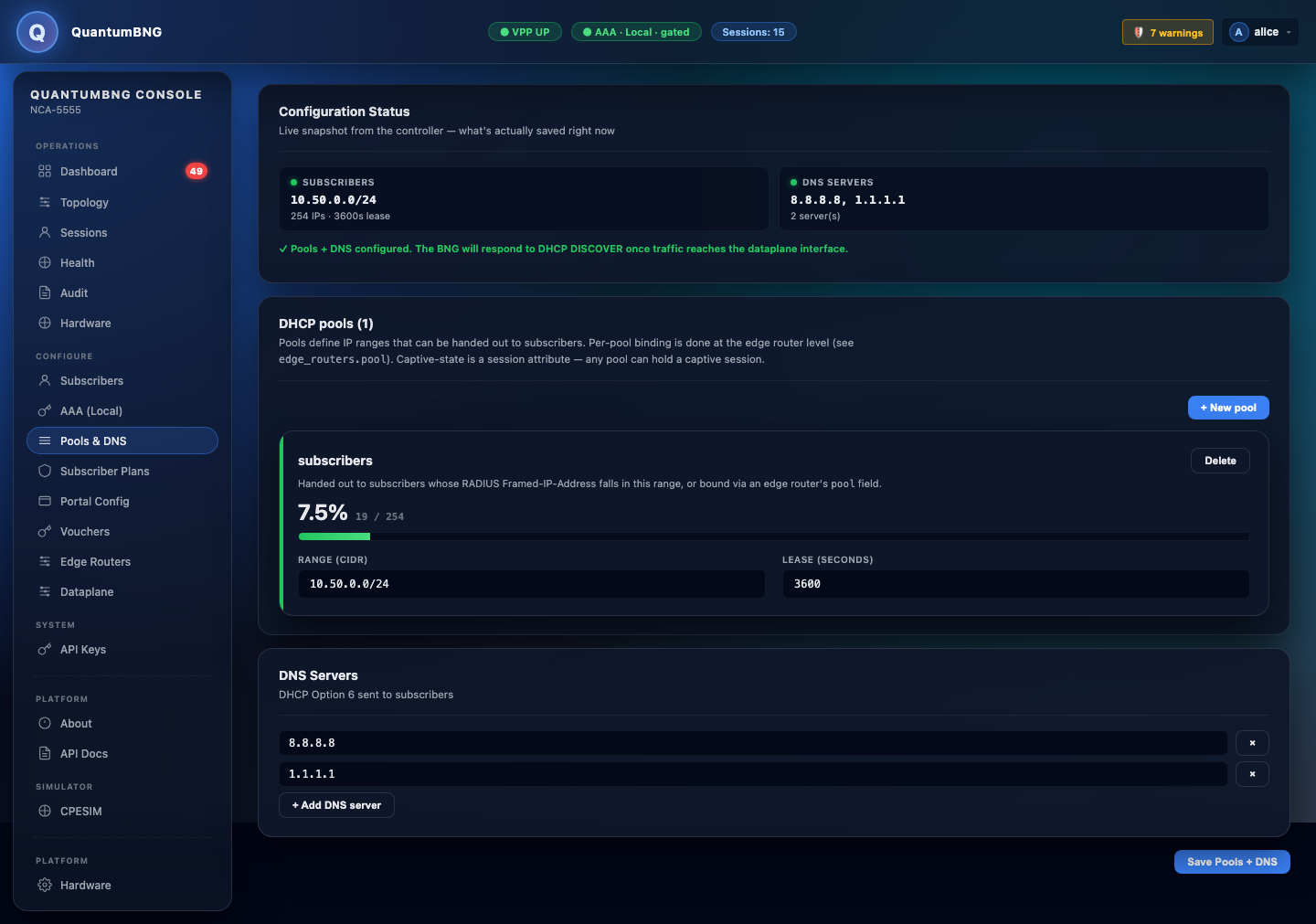
How to confirm it
The point of this section is to separate "the pool is genuinely full" from "requests are not reaching the pool", which present identically to the subscriber.
- Open Pools & DNS and read the utilisation bar for the pool the affected subscribers use. The same numbers are available from the API as
GET /v1/bng/pools, which returnstotal,allocatedandfreeper pool. - Look for the allocation-failure line. This is the test that settles it. If it is there, DISCOVERs are arriving and being refused for want of an address — genuine exhaustion. If it is absent while subscribers still fail, the requests never reached the pool at all and the problem is upstream of DHCP: relay, VLAN, or access-side reachability. The figures behind it come from
GET /api/bng/counters. - Read the lease time alongside the size. Each pool shows its
leasetime(also in theGET /v1/bng/poolsresponse). A long lease on a churning population exhausts a pool that is nominally big enough, because addresses stay allocated to CPEs that have gone away and are not reclaimed until the lease expires. - Check whether the affected subscribers all map to one pool or are spread across several — a single affected pool supports this diagnosis, a scattering of them does not. Which pool a session lands in is decided by RADIUS
Framed-IP-AddressCIDR match, or by the edge-router pool binding.
What to collect before raising a ticket
- The Pools & DNS screen, or the
GET /v1/bng/poolsresponse, captured while the problem is happening —total,allocatedandfreeafter the fact tell us very little. - Whether the allocation-failure line is present, and its value.
- The configured pool ranges and lease time, and any change made to either recently.
- How many subscribers you expect to be online on this pool at peak, and how that compares with the pool size.
- Whether anything upstream changed at the same time — a re-address, a migration, or a large batch of new subscribers.
The fix
Three remedies apply, and they differ in how quickly they take effect and how much they touch a running system. In order of safety:
- Add a pool. Pools & DNS → Add pool, give it a name, a CIDR, a lease time (the 3600s default is fine) and one or more DNS resolvers, then Save. Point the relevant plan(s) at it so subscribers prefer it. This adds capacity without altering the pool your online subscribers are already holding addresses from, which is why it is first on this list.
- Enlarge the existing pool's range. Widening the CIDR adds free addresses without disturbing the ones already allocated. Do this when the pool is simply undersized for the subscriber count rather than churning.
- Shorten the lease time. This is the remedy for a pool exhausted by churn rather than by size, and it is gradual by design: a subscriber does not pick up a new lease time until it renews, which for a DHCP client is roughly halfway through the lease it currently holds. Halving a 24-hour lease therefore starts reclaiming addresses over the following day, not immediately. Do not use it as an emergency measure.
Editing an existing pool's range or lease time is applied through the controller while the pool is live. It is not a change we would make first on a busy box — add a pool if you need capacity now, and make edits to an existing pool during a window where a re-lease would not matter.
If the pool is correctly sized, the lease time is sane and the alloc-failure counter is still climbing, open a ticket with the material above.