
CPESIM User Guide
Version: 0.4.16 (ships with QuantumBNG v1.3.0-13)
New in 0.4.16. The simulator is substantially cheaper to run, which matters
because on a small box CPESIM competes with the BNG it is testing:
- Relayed DHCP frames are assembled directly instead of through a packet library —
36x cheaper per frame on our lab rig, 17x on the evaluation appliance. Frame
building was what limited onboarding rate, not the BNG. - Each received frame is decoded once rather than twice.
- The fleet timer is advanced on a schedule instead of on every loop iteration; it
previously accounted for about three quarters of the onboarding loop. - QoS compliance no longer scores subscribers that produced no measurement. A
subscriber that moved no traffic used to count as compliant, which could report a
clean pass while half the fleet was silent. Silent and unresolved subscribers are now
reported as their own counts.
Last updated: 2026-07-29
1. What is CPESIM?
CPESIM is a subscriber simulator for QuantumBNG. It runs on the same box as your BNG and produces realistic DHCP/IPoE subscriber sessions and downstream/upstream traffic against your data plane — no CPEs, no wire lab, no traffic generator hardware required.
What operators use it for:
- Customer evaluations — spin up a demo BNG with 50 simulated subscribers streaming video, so a prospect sees a real dashboard populated with real data instead of a static screenshot.
- Sizing and tuning — verify that a hardware profile actually sustains its rated throughput before committing to a production build.
- Regression sanity checks — after a controller upgrade or a config change, run a 5-minute demo and confirm nothing broke.
- Feature demos — captive portal, plan changes, session churn — all reproducible on demand.
CPESIM was distilled from Bluedot's own internal testing tools. What runs in the About-page plugin is the same subscriber engine we use to sign off releases — the same code path that produces the throughput numbers on our release notes now produces yours.
What it isn't:
- Not a load generator you plug into a production BNG. CPESIM sets up its own veth pairs and drives its own DHCP flows inside a network namespace on the same box — it doesn't touch a real wire and it doesn't replace TRex for wire-side testing.
- Not multi-box. One CPESIM instance runs on one BNG. If you want subscriber traffic sourced from a separate box, use CPESIM's underlying
quantumtestframework directly.
2. Prerequisites
Before installing CPESIM you need:
| Requirement | Notes |
|---|---|
| QuantumBNG v1.3.0-13 or later | The CPESIM version is pinned by the wrapper, so an older wrapper installs an older CPESIM. sudo cat /opt/bng-deploy/installer/PINS.sh should show BUNDLE_VERSION="1.3.0-13". v1.2.0-21 or later still works, but pins CPESIM 0.3.x and misses everything below. |
| An admin login to the BNG web UI | Install / remove require the admin_only role. A read_write operator can Start/Stop the demo but can't install the plugin. |
Outbound HTTPS to github.com |
Install pulls the plugin tarball from github.com/Bluedot-Insight/cpesim/releases. Air-gapped labs can point at an internal mirror — see §7. |
~50 MB free disk at /opt/bng-demo |
The engine payload itself is small; per-run state fits comfortably. |
| VPP running and healthy | CPESIM uses vppctl to attach its own host-demo0p and host-demo-upp interfaces. Confirm with sudo systemctl is-active vpp. |
CPESIM is idle-safe: installing it does not affect any production traffic on the BNG until you start a demo run.
3. Installation
From the About page
-
Log in to the web UI at
https://<your-bng>:8443/with an admin account. -
Navigate to About in the left nav.
-
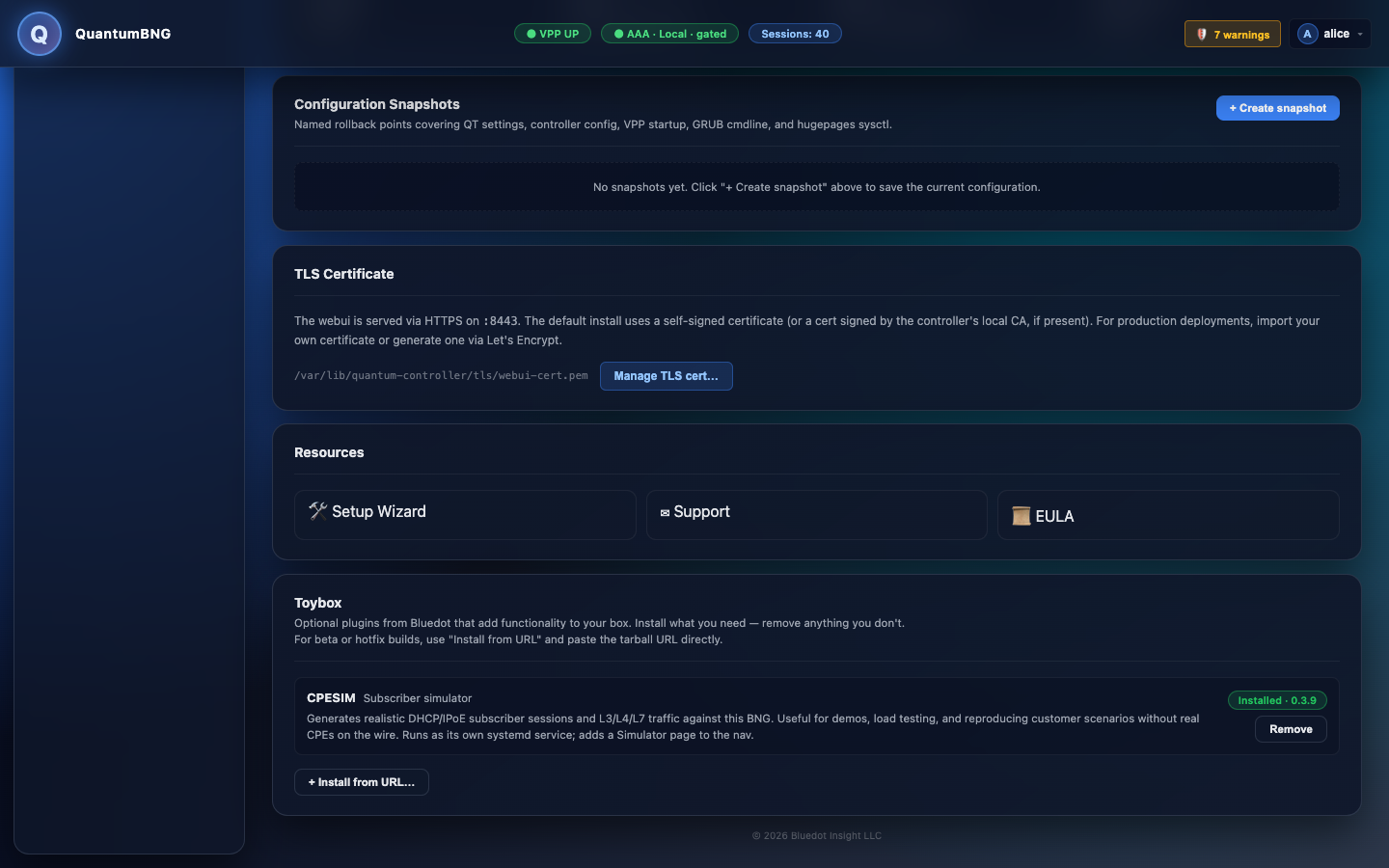
In the Toybox section, find the CPESIM card. When the plugin isn't installed the card shows a Not installed pill and an Install button.
-
Click Install.
The button changes to Installing…. The install fetches the tarball, verifies its published SHA-256 checksum, unpacks it to
/opt/bng-demo/, and starts thebng-demo.servicesystemd unit. Typical duration: 20–60 seconds depending on your GitHub download speed. -
When the install completes, the page refreshes and the CPESIM card shows an Installed pill with the version number:
-
A new Simulator entry appears in the left nav under its own group.
From the command line (advanced)
For air-gapped labs, staged rollouts, or scripted deploys, install directly through the module API:
sudo /opt/bng-deploy/venv/bin/python -c "
from quantumtouch_bng.helpers.cpesim_module import CpesimModule
r = CpesimModule().install({})
print(r.ok, r.detail)
"
Pass a url parameter to override the default download source (e.g. an internal mirror):
CpesimModule().install({"url": "https://your-mirror/cpesim_v0.4.16.tar.gz"})The mirror must also serve <url>.sha256 with the matching checksum.
4. First demo run
Configure and start
-
Navigate to Simulator in the left nav.

-
The default configuration is a reasonable starting point: 50 subscribers, 20% captive (unauthenticated), the rest provisioned; 50 Mbps offered per subscriber; downstream traffic enabled; run-until-stopped (Duration 0); trickle churn every 25 s. For your first run, leave the defaults and click Start.
-
The status changes to starting while access wiring runs (veth pair creation, network-namespace setup, VPP host-interface attach, BNG enable_disable). This takes 5–10 seconds.
-
Then the demo enters the onboarding phase — CPESIM sends DHCP DISCOVER for each subscriber and waits for the BNG to move them to BOUND. For 50 subs this typically finishes within 20–45 seconds.
-
Once onboarding completes, the dashboard populates:

What each status box means
| Box | Meaning |
|---|---|
| Connected | Number of provisioned subscribers currently in the BNG's BOUND state. |
| Captive | Number of subscribers stuck in the captive portal state (unprovisioned — deliberately included so the demo shows both flows). |
| Elapsed | Seconds since the current run started. |
| Throughput | Live downstream Mbps, sampled directly from VPP's host-demo0p tx bytes counter — the same source the BNG dashboard uses. The two numbers will agree. |
| Last error | null under normal operation. Any string here is a diagnostic worth investigating (see §6). |
What's happening under the hood
- Each subscriber is a real DHCP client (Scapy-based) sending frames on an
AF_PACKETsocket bound inside thecpesim-subsnetwork namespace. The BNG sees identical wire behavior to real CPEs. - Once BOUND, subscribers open TCP connections to the origin server (bundled with the plugin, listening on
10.0.0.1:8080on the other side of the BNG) and download a 2 GBvideo.mp4inrealisticmode — paced tooffered_mbpsper subscriber. - Traffic runs in two overlapping 60-second bursts (phased 30 s apart) so the downstream stays continuous even during between-burst engine restarts.
- Every 25 seconds one provisioned subscriber is disconnected and re-DORAs — a visible "churn" event you can watch on the sessions timeline.
Stop and restart
Click Stop to end the current run. The demo unwinds: subscribers RELEASE, VPP host-interfaces detach, veths and the netns are torn down. This takes 10–20 seconds.
You can click Start again immediately — a defensive cleanup pass runs at the top of every access_setup and handles any state left behind by an aborted teardown.
5. Understanding the dashboard
The Simulator page's throughput readout and the BNG dashboard's downstream graph both read from the same VPP counter, so they should always agree within one polling interval. If they diverge by more than ~10%, investigate — either the poll interval alignment is off or something is throttling one path.
Expect a per-second downstream rate in the mid hundreds of Mbps to low gigabits for a default 50-subscriber run at 50 Mbps offered per sub. The "realistic" profile downloads full-speed when the origin can serve, so the aggregate is bounded by whichever comes first: the sum of per-sub caps, the box's kernel/veth throughput, or the origin server's serving capacity. The rate is naturally noisy at the second-scale; over any 30-second window the average settles down to a steady value.
The traffic pattern intentionally overlaps two burst loops. In VPP-counter terms this means most of the wire is always in use; you should not see the 0-Mbps dropouts that earlier CPESIM releases had.
6. Common tasks & troubleshooting
"The demo says running but I have 0 connected subscribers"
This is the classic wedge — usually stale kernel state from an earlier aborted run that the defensive cleanup didn't catch. Recover from the UI:
- On the Simulator page, click Reset simulator (top-right of the CPESIM header).
- Wait ~10–15 seconds for the reset to complete — bng-demo stops, all
demo*veths are cleaned up, thecpesim-subsnetns is deleted, VPP + controller + bng-demo are restarted, and the engine confirms it's responding. - Click Start again — subscribers should onboard normally within 20–45 seconds.
No shell access required. If Reset fails for some reason (e.g. VPP is unreachable), the button surfaces the error text right underneath.
"Throughput reads 0 on the CPESIM page but the BNG dashboard shows traffic"
If you're on CPESIM ≤ v0.3.8 you'll see this — the older CPESIM read throughput from an internal counter that undercounted during subscriber churn. Upgrade to v0.3.9 (bundled with QuantumBNG v1.2.0-21+).
"I clicked Install and got kicked to the login page"
Fixed in QuantumBNG v1.2.0-17. The old Toybox poller used fetchWithAuth, which treats any 401 (including transient ones during a busy install) as a session failure and redirects. Upgrading fixes it.
"Install downloaded an older CPESIM version than I expected"
The About-page Install button uses the version pinned in the currently-installed wrapper (CPESIM_VERSION in cpesim_module.py). To install a newer plugin than the wrapper pins, either upgrade the wrapper OR pass an explicit URL:
sudo /opt/bng-deploy/venv/bin/python -c "
from quantumtouch_bng.helpers.cpesim_module import CpesimModule
CpesimModule().install({'url': 'https://github.com/Bluedot-Insight/cpesim/releases/download/vX.Y.Z/cpesim_vX.Y.Z.tar.gz'})
"
"I don't see the Simulator page in the nav"
Two possibilities: the plugin isn't installed (check About → Toybox), or the browser has a stale capability cache. Hard-refresh (Cmd+Shift+R / Ctrl+F5) and it should appear.
"The trickle re-dora: [Errno 9] Bad file descriptor error is showing on last_error"
Cosmetic and only appears on CPESIM ≤ v0.3.7. It's a benign shutdown-race warning (the trickle thread races the transport socket close during Stop). Suppressed in v0.3.8+.
"I need to see what CPESIM is actually doing at the wire level"
# What's in the sub-side netns?
sudo ip netns exec cpesim-subs ip addr show demo0

# TCP sockets each sub has open
sudo ip netns exec cpesim-subs ss -tan

# VPP counters (what the BNG dashboard sees)
sudo vppctl show interface host-demo0p host-demo-upp

# Live journal
sudo journalctl -u bng-demo -f
"I need to remove CPESIM entirely"
From the UI: About → Toybox → Remove on the CPESIM card. Under the hood this calls /demo/stop to release sessions and tear down the data path, then systemctl disable --now bng-demo and removes /opt/bng-demo. The nav's Simulator entry disappears within a few seconds.
7. Reference
Installed layout (post-install):
| Path | Purpose |
|---|---|
/opt/bng-demo/ |
Plugin payload (Python source, install.sh, VERSION) |
/etc/systemd/system/bng-demo.service |
Systemd unit — enabled + started by install.sh |
/usr/local/bin/reset-cpesim |
One-liner state-cleanup script |
/tmp/quantumtouch-installer-<VERSION>/ |
Extracted wrapper installer (kept until you rm -rf) |
Network layout during a run:
| Kernel iface | Netns | Role |
|---|---|---|
demo0 |
cpesim-subs |
Sub-side of the access veth. Owns all framed IPs (10.50.0.2/32 through 10.50.0.<N+1>/32) plus RELAY_GIADDR (10.50.0.254/32). Sub processes bind AF_PACKET sockets here. |
demo0p |
root | Root-side of the access veth. VPP attaches as host-demo0p and the BNG runs its access-input node on it. |
demo-up |
root | Origin-side of the uplink veth. Owns 10.0.0.1/24. OriginServer binds 0.0.0.0:8080 to it. |
demo-upp |
root | VPP-side of the uplink veth. VPP attaches as host-demo-upp and installs the default route (10.0.0.1 via host-demo-upp). |
Version pin bump procedure (for ops):
- New CPESIM release published to
Bluedot-Insight/cpesim. - Bump
CPESIM_VERSIONinquantumtouch_bng/helpers/cpesim_module.py. - Bump
BUNDLE_VERSIONininstaller/PINS.sh. - Ship a new QuantumBNG release; the wrapper's About page now installs the new plugin.
8. Getting help
- Release notes for each version:
Bluedot-Insight/quantumipoebng/releases - Source (open):
Bluedot-Insight/quantumtouch-bng(wrapper),Bluedot-Insight/quantumtouch-quantumtest(CPESIM engine) - Support:
alpha@bluedot-insight.com
© 2026 Bluedot Insight LLC. Distributed under the Quantum IPoE BNG End User License Agreement.